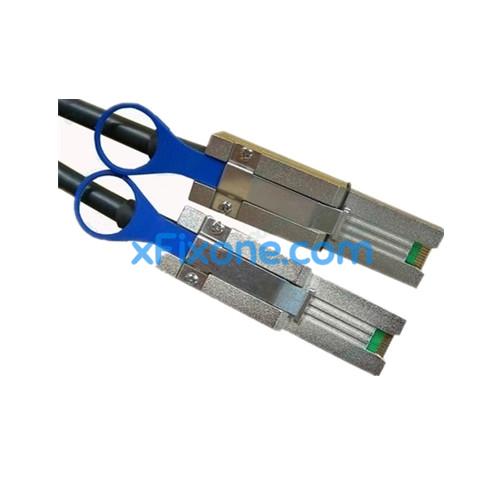
external Mini SAS cable SFF-8088 to SFF-8088 6m
Basic introduction
SAS line
SAS connector applications – SAS HBA / RAID card, SAS hard disk / tape drives, disk backplane, SAS enclosure (RAID / JBOD)
SAS connector specification – SATA Style (SATA style), SFF-8482, SFF-8484, SFF-8470; SFF-8087, SFF-8088, SFF-8643 and SFF-8644
1 Install / Remove the SAS cable
1.1 installation steps
Step 1: SAS cable connector is inserted into the device side connector, cable terminal connector with anti-anti-card slot, insert the need to ensure that the cable end is connected with both the device side connector slot match.
Step 2: Push the connector until a “click” sound connections, the connection is in place, SAS cables in place
1.2 steps taken
Step 1: Hold the cable connector and cable pull ring,
Step 2: Pull the tab, so that the hook pops up.
Step 3: Pull out the connector.
2 speed control cable minimum bend radius measured:
cable specifications for 6m; cable reference diameter of 10mm, minimum bend radius of 50mm;
cable specifications for 3m; cable reference diameter of 8.6mm, the minimum bend radius of 40mm;
cable specifications for
3 Installation Notes:
1, non-bending
2, non-reversing connector
3, controlled bending diameter
2, cable minimum bend radius requirements

 45189-6 Main Drive Belt Compatible for Zebra S600 (Tear Off and Cutter Only) - 203dpi
1 × $16.00
45189-6 Main Drive Belt Compatible for Zebra S600 (Tear Off and Cutter Only) - 203dpi
1 × $16.00  PS2 to RS232 Serial Cable(2.6ft) For Computers And Scanners
1 × $64.00
PS2 to RS232 Serial Cable(2.6ft) For Computers And Scanners
1 × $64.00